Invoice Maker by Invoice Home
- 4.1
- Rating
- 1.00M
- Installs
- Free
- Price

 Analysis by App-foxy
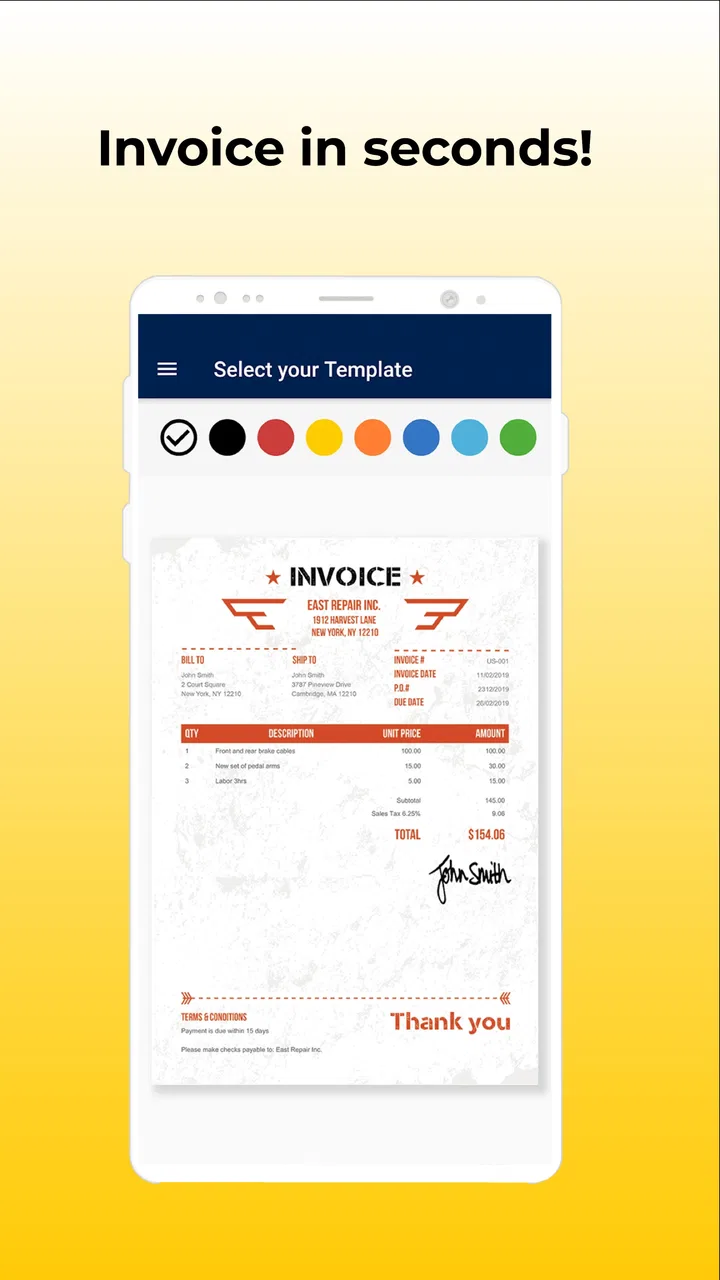
When I need to send a clean invoice without turning a small job into an evening of administration, Invoice Maker is the kind of tool I reach for first. It is a business app from Invoice Home Inc. that focuses on creating and sending PDF invoices from professional templates, and my overall impression is that it works best as a simple link in a small-business routine rather than as a complete accounting system.
I tested it with the mindset of a freelancer who has finished a task, wants to bill promptly, and does not want to rebuild the same document from scratch every time. That distinction matters. The app is useful because it reduces the distance between finishing work and asking to be paid. It is less suitable for someone who needs deep bookkeeping, inventory control, payroll, or a full financial dashboard.
It is free to install, with optional in-app purchases ranging from around seven to nine dollars per item. The app is rated for Everyone, and its current version is 5.8.5. With an average rating of 4.2 from around 7,100 ratings and over one million installs, it has clearly found an audience among people who want a straightforward mobile invoicing option.
You May Also Like

 Blood Strike: 2.5 Anniversary
Blood Strike’s Loadouts Turn Every Drop Into a Tactical Gamble
A close look at Blood Strike’s custom loadouts: how fast access to signature weapons reshapes its battle royale rhythm, rewards preparation, and narrows the gap between fights.

 Pandora - Music & Podcasts
Pandora’s Music Is Easy to Start, but Harder to Recover
Pandora’s strength is its low-effort path from a seed to a station. Its weak spot is how much confidence it asks you to place in connection, setup, and quiet recovery.

 8 Ball Pool
 Is Built on Rivalries, Rematches, and Routine
A close look at the rivalries, rematches, shared routines, and unanswered safety questions that turn a quick pool match into a persistent mobile community.

 Samsung Music
’s Quiet Strength Is Playing What You Already Own
Its reach comes less from spectacle than from dependable access to a personal library. That simplicity is both the app’s strongest retention engine and its ceiling.

 AccuWeather: Weather Radar
AccuWeather Review: A Quick, Clear Forecast for Everyday Decisions
For everyday plans, the best forecast is the one you can understand quickly. AccuWeather makes rain timing, radar, and local conditions easy to act on, with a few trade-offs.

 Hill Climb Racing
Why Hill Climb Racing Still Turns Crashes Into One More Run
A tiny car, a bumpy hill and one more upgrade: Hill Climb Racing keeps resurfacing because its simple chaos makes every near-miss feel personal.
More From Our News Desk



Where Invoice Maker fits before and after the work
I’d use this section to connect invoice preparation with the less visible work that follows: saving a copy, recording when it was sent, and checking whether payment arrives. That small handoff matters because a polished PDF is only one step in a billing routine; keeping the next action clear is what makes the workflow dependable.
Start with a small billing system, not a blank screen
The most useful way to approach this app is to decide what information you will collect before opening it. An invoice is only as reliable as the notes behind it. Before creating one, I would keep the client’s legal or preferred name, contact details, the work date, a short description of what was delivered, the agreed amount, and any payment instructions in one consistent place.
That preparation prevents a common mistake: opening an invoice template and then searching through messages, notebooks, email threads, and photos for the details needed to complete it. Invoice Maker can make document creation faster, but it cannot repair unclear agreements. If the scope or price was never written down, a polished PDF will not solve the underlying problem.
For a solo designer, tutor, cleaner, photographer, repair worker, or consultant, the app makes sense at the point where the job is complete and the billing information is already known. I would not use it as a substitute for recording expenses or tracking business performance. I would use it as the final document-making step in a wider routine.
Capture the details while they are still fresh
A practical everyday scenario is a freelance editor who finishes a short project on a phone between appointments. Instead of waiting until the weekend, the editor can open the app, choose a suitable professional template, enter the client and service details, review the total, and send the resulting PDF while the work is still easy to remember.
That timing has a real productivity benefit. Delayed invoicing often creates small errors: a forgotten extra task, the wrong service date, or a vague description that makes the client ask for clarification. Creating the invoice immediately does not guarantee payment, but it makes the request clearer and removes one more unfinished task from the day.
I also found that the PDF format is important for practical reasons. It gives the recipient a document that can be saved, forwarded, or attached to an email without depending on the recipient having the same app. For a small operator who wants a professional-looking document without designing one manually, that is a meaningful advantage.
Use organization to reduce repeated decisions
The app’s value grows when I treat each invoice as part of a repeatable process. I would keep a simple naming convention for exported files, such as the client name followed by the invoice identifier and date. I would also store sent copies in a dedicated folder outside the app, because relying on memory or a crowded message thread makes later follow-up unnecessarily difficult.
This is one of the less obvious trade-offs of a mobile invoice maker: it can create the document quickly, but the user still needs a filing habit. A good template does not automatically create an accounts-receivable system. If you send several invoices each week, a separate folder or spreadsheet for status—draft, sent, paid, or overdue—will make the app much more useful.
I would also avoid changing the visual style for every customer. Choosing one readable template and using it consistently makes the business look more organized. The templates are there to save design time, not to encourage endless decoration. Clear service descriptions, totals, and payment instructions matter more than a dramatic layout.
Build a routine that survives busy weeks
A sustainable routine could be as simple as this: record the work immediately after delivery, prepare the invoice before starting the next unrelated task, check the PDF once, send it through the usual communication channel, and mark the invoice as sent in a separate record. That sequence is short enough to repeat and clear enough to hand over if someone else later helps with administration.
The strongest benefit is not any single template. It is the reduction of friction between the decision to bill and the finished document. When billing requires opening a desktop program, remembering a complicated workflow, and rebuilding the layout, it is easy to postpone. A phone-based tool is more convincing when the invoice can be prepared during a natural pause in the workday.
At the same time, I would set a boundary around what the app is responsible for. Invoice Maker can help create and send the invoice, but I would not assume that sending a PDF means the invoice has been paid. Payment confirmation, reminders, bank reconciliation, and tax records still need their own process. Keeping those responsibilities separate makes the workflow easier to audit.
Where it compares well with familiar alternatives
Compared with making invoices in a word processor, Invoice Maker is more focused. A general document editor gives you broad control, but that flexibility can become a burden when every invoice requires alignment, spacing, and formatting decisions. A dedicated invoice app is usually faster for repeated billing and less likely to produce a document that looks improvised.
Compared with a spreadsheet, the app is also more approachable for someone who does not want to maintain formulas. Spreadsheets are stronger when you need a detailed register of invoices, running totals, or custom calculations across many records. Invoice Maker is better at producing an individual client-facing document with less setup.
Compared with a full accounting platform, it is intentionally narrower. Accounting software may be the better choice for businesses that need expense categorization, tax reporting, inventory, recurring financial statements, or multiple users working from one central system. Invoice Maker is attractive when the immediate problem is professional billing, not complete financial management.
That narrower focus is not automatically a weakness. In my experience, small operators often abandon complicated tools because the administrative system becomes larger than the business need. A focused invoice workflow can be more sustainable than a powerful platform that is rarely opened. The right choice depends on whether you need a document maker or a financial control center.
Small habits that improve the result
One useful habit is to write service descriptions for the client, not for yourself. “Website work” may be obvious to the person who performed it, but “homepage layout revisions and mobile display adjustments” gives the recipient a clearer record. The app makes it easy to place text into a template, so the quality of that text deserves attention.
Another is to review the recipient details before sending, especially when working from a phone. Mobile entry is convenient, but a small typing mistake in an email address or business name can make an otherwise correct invoice look careless. I would treat the final PDF as a proofing step, not merely as a formality.
A third is to separate invoice creation from payment chasing. Send the document through the agreed channel, then record when it was sent and decide when a reminder is appropriate. This prevents the common failure of assuming that a message containing an attachment is enough to manage the whole payment cycle.
For repeat clients, I would prepare a small personal checklist containing the usual service wording, payment terms, and delivery channel. Even if the app supplies templates, the checklist reduces the mental load of remembering client-specific preferences. It also helps prevent inconsistent descriptions when several jobs are completed close together.
Friction points worth understanding
The first limitation is scope. Someone looking for a full business-management solution may quickly outgrow this app. Creating a professional PDF is not the same as managing a complete ledger, and I would not choose this as the only financial tool for a larger operation with complex reporting needs.
The second is the need for deliberate record keeping. If invoices are created and sent but copies and statuses are not organized, the user can still lose track of what was requested and what remains outstanding. This is not a reason to avoid the app; it is a reminder that convenience at the creation stage does not replace follow-through.
The third is the optional purchase model. The app is free, but some items cost around seven to nine dollars each. Before building a workflow around a particular paid option, I would check exactly what it unlocks and whether the available free experience already covers the way I invoice. That small pause can prevent an unexpected expense.
There is also a human limitation: templates can make a document look professional, but they cannot decide whether the wording is accurate or whether the amount matches the agreement. I would always compare the finished invoice with the original quote or message before sending it. A neat layout should never create false confidence.
Who should adopt it, and who should skip it
I would recommend Invoice Maker to freelancers, independent contractors, and very small businesses that send occasional or moderately regular invoices and want a quicker alternative to designing documents manually. It is especially appealing to people who work away from a desk and need to turn completed work into a shareable PDF without waiting until they return to a computer.
It can also suit a new business owner who is still establishing an administrative routine. The app gives that person a clear place to begin: prepare the document, check it, send it, and store a copy. Used alongside a simple payment tracker and a folder structure, it can support a disciplined process without demanding a full accounting setup immediately.
I would skip it as a primary solution if the business needs detailed financial reporting, inventory management, payroll, complex tax workflows, or extensive collaboration. In those cases, a dedicated accounting platform or a more complete invoicing service will probably justify its extra complexity. I would also look elsewhere if the main requirement is advanced automation rather than quick manual document creation.
The app is available for Android devices running Android 7.0 or later, which keeps it accessible to people using older compatible phones. Its Everyone age rating also makes it broadly approachable, although business suitability still depends on the user’s own record-keeping needs rather than on the age classification.
My final take on the workflow
After using Invoice Maker as part of a broader billing routine, I see it as a practical bridge between finished work and a professional invoice. Its strength is focus: it helps me create a presentable PDF quickly, without the formatting overhead of a general document editor. That is valuable when the alternative is postponing billing because the process feels too large.
My recommendation comes with a clear condition: pair it with a simple system for storing copies, tracking payment status, and checking agreements. Once those habits are in place, the app becomes more than a template picker. It becomes a dependable final step that makes invoicing easier to repeat during busy weeks.
Invoice Maker is best for people who need simple, mobile-first billing rather than complete accounting. I would choose it for a freelancer who wants to send a clean invoice immediately after a job, and I would move to a broader financial platform when the business outgrows individual PDF documents. For that specific use case, it is a sensible free starting point, with optional purchases to consider carefully and limitations that are easy to manage if you know what role the app should play.
FAQs for Invoice Maker by Invoice Home
01What features does Invoice Maker by Invoice Home offer?
Invoice Maker by Invoice Home provides a comprehensive suite of features for creating professional invoices. Users can choose from various templates, customize invoices with logos, and use multiple currencies. The app also supports recurring invoices, estimates, and PDF export. Seamless integration with payment gateways like PayPal and Stripe enhances its utility for businesses.
02Is Invoice Maker by Invoice Home easy to use for beginners?
Yes, Invoice Maker by Invoice Home is designed with user-friendliness in mind. The intuitive interface allows users to navigate effortlessly. Beginners can quickly create and send invoices without a steep learning curve. The app offers guided setup and helpful tutorials to assist users in getting started smoothly.
03Does Invoice Maker by Invoice Home support cloud storage?
Invoice Maker by Invoice Home supports cloud storage, ensuring that your invoices are safely backed up and accessible from any device. Users can sync their data across multiple devices, making it convenient to manage invoices on the go. This feature enhances flexibility and security for your business transactions.
04Can Invoice Maker by Invoice Home handle tax calculations?
Yes, the app can automatically calculate taxes for each invoice, supporting various tax rates, including VAT and GST. Users can customize tax settings to match their business requirements, ensuring compliance with local tax regulations. This feature simplifies the invoicing process, saving time and reducing errors.
05Is there a cost associated with using Invoice Maker by Invoice Home?
Invoice Maker by Invoice Home offers a free version with basic functionalities. However, to access advanced features like unlimited invoices, additional templates, and premium support, users can opt for a subscription plan. Pricing is competitive, providing excellent value for businesses looking for professional invoicing solutions.
Pros
- Intuitive interface for easy navigation.
- Wide range of customizable templates.
- Supports multiple currencies and languages.
- Offline access to invoices.
- Secure data backup and cloud sync.
Cons
- Limited free features; premium needed.
- No integration with some accounting apps.
- Occasional sync delays reported.
- Customer support limited to email.
- Ads in the free version can be intrusive.

Invoice Maker by Invoice Home
Gallery